> ## Documentation Index
> Fetch the complete documentation index at: https://docs.wji.ai/llms.txt
> Use this file to discover all available pages before exploring further.
# Workspace AI chat
> Ask questions about your workspace or let an agent act on your files.
The right-hand panel in Idea Studio is an AI chat scoped to the workspace.
This panel appears in Idea Studio but not on the Infinite Canvas or in Digital Host.
## Two modes
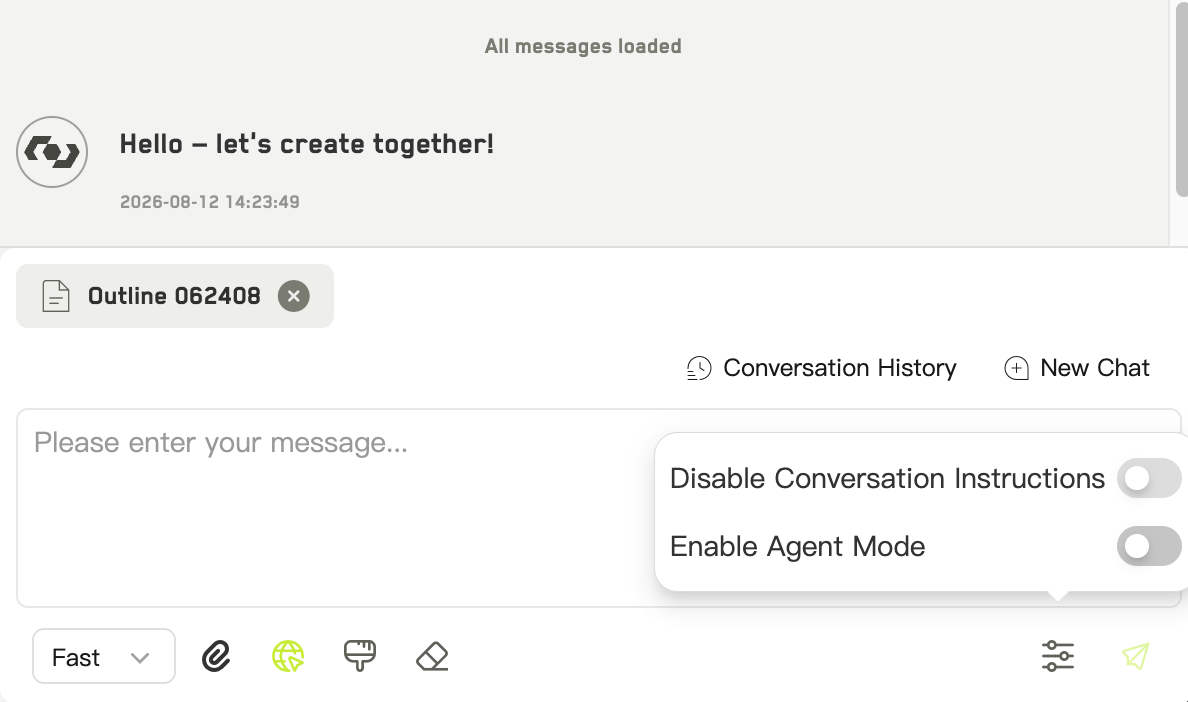 A conversation. The AI answers using whatever context you have given it, but does not change anything in your workspace.
The AI can act on your workspace — creating, reading, and modifying files in the tree. Use it when you want work done rather than answered.
Agent mode has to be enabled for the workspace before it appears.
## Giving it context
Right-click any idea in the file tree and choose **Add to chat**. The idea is attached to the conversation, and the AI can read its summary, content, and prompts.
## Conversations
Each app in the workspace keeps its own conversation thread, so Idea Studio's chat history stays separate from other apps'. You can browse past conversations, start a new one, and pick which agent to talk to.
## Saving what comes back
When a reply contains structured idea data, a button appears to save it all into your workspace at once. Afterwards WJI reports what happened:
* how many were **saved**
* how many **already existed**
* how many were **skipped**
This makes it safe to run a similar request twice — duplicates are recognized rather than piled up.
Agent mode is the better choice for tidying jobs: reorganizing folders, filling in missing summaries across a set of characters, or tagging a batch of ideas consistently.
A conversation. The AI answers using whatever context you have given it, but does not change anything in your workspace.
The AI can act on your workspace — creating, reading, and modifying files in the tree. Use it when you want work done rather than answered.
Agent mode has to be enabled for the workspace before it appears.
## Giving it context
Right-click any idea in the file tree and choose **Add to chat**. The idea is attached to the conversation, and the AI can read its summary, content, and prompts.
## Conversations
Each app in the workspace keeps its own conversation thread, so Idea Studio's chat history stays separate from other apps'. You can browse past conversations, start a new one, and pick which agent to talk to.
## Saving what comes back
When a reply contains structured idea data, a button appears to save it all into your workspace at once. Afterwards WJI reports what happened:
* how many were **saved**
* how many **already existed**
* how many were **skipped**
This makes it safe to run a similar request twice — duplicates are recognized rather than piled up.
Agent mode is the better choice for tidying jobs: reorganizing folders, filling in missing summaries across a set of characters, or tagging a batch of ideas consistently.